Configurer la planification
- Ouvrez l'onglet Planifier.
- Sélectionnez les articles à republier régulièrement.
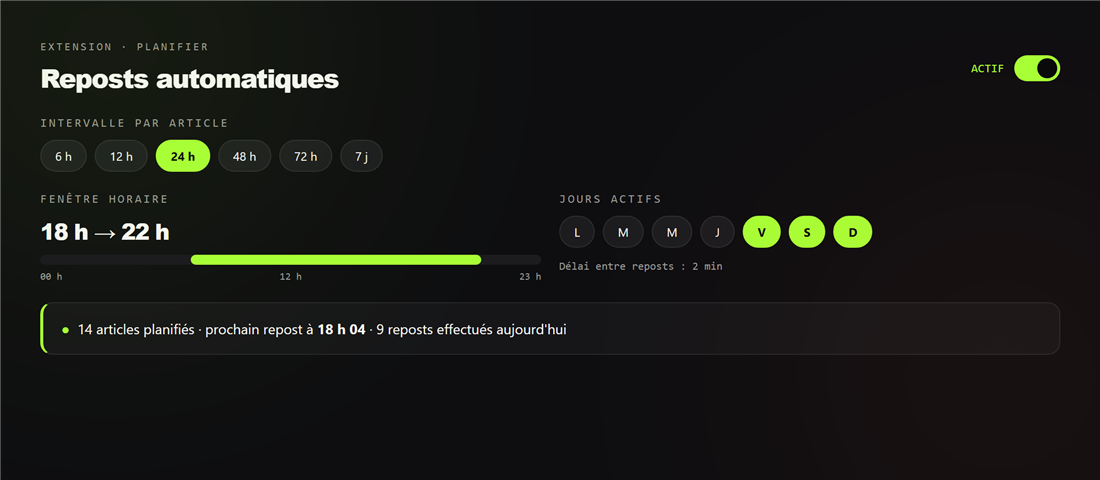
- Choisissez l'intervalle (de 6 h à 7 jours) et la fenêtre horaire (ex. 9 h–22 h).
- Optionnel : limitez aux jours actifs de votre choix.
Un délai configurable (1 à 30 min) sépare chaque repost pour rester naturel. La planification respecte votre fuseau horaire.
Suivi
Le panneau affiche les reposts effectués du jour, le dernier repost et les éventuelles erreurs. Les articles en erreur sont réessayés automatiquement.
Questions fréquentes
La planification fonctionne-t-elle ordinateur éteint ?
Non : la republication programmée a besoin de Chrome ouvert avec l'extension et d'un onglet Vinted connecté au bon profil ; votre ordinateur doit donc être allumé. Un créneau manqué n'est pas perdu : l'annonce est republiée à la prochaine ouverture, dans vos horaires, une annonce à la fois.
À quelle fréquence republier ?
Entre une fois par jour et une fois tous les deux-trois jours par article suffit. Privilégiez les créneaux du soir et du week-end.
Prêt à essayer ?
Installez Flipzer et automatisez vos ventes Vinted depuis votre navigateur.
Commencer gratuitement